
Full Stack /dev_
A full-stack developer with a deep understanding of modern web architectures and Websockets. The ideal candidate will be proficient in both client-side and server-side development, with particular expertise in React, Electron, and database management systems.
What you'll do
- Design and develop cross-platform desktop applications using Electron and modern web technologies
- Implement real-time data synchronization systems using WebSocket protocols
- Create offline-first applications with local data persistence and synchronization capabilities
- Develop and maintain efficient data synchronization mechanisms between signage clients and server
- Implement secure communication channels between desktop applications and backend services
- Collaborate with the team on architecture decisions and technical implementations
- Write clean, maintainable, and well-documented code
Required Skills & Experience
- Strong expertise in Electron.js desktop application development
- Proven experience with WebSocket implementation and real-time communication systems
- Advanced knowledge of JavaScript/TypeScript
- Experience with React.js or similar modern frontend frameworks
- Proficiency in implementing offline-first architectures
- Experience with IPC (Inter-Process Communication) in Electron
- Knowledge of desktop application security best practices
- Experience with Git version control
- Strong problem-solving abilities and attention to detail
Technical Stack
- React.js
- Electron.js
- WebSockets
- React DnD libraries
- Fabric.js, Three.js, Konvajs/React-Konva
- Framer Motion
- Modern CSS (Flexbox, Grid, CSS-in-JS)
- Version Control (Git)
- Databases (MongoDB/SQL)
Preferred Qualifications
- Knowledge of Electron app packaging and distribution
- Experience with automated testing (Jest, Mocha)
- Experience with application auto-updater implementation
- Knowledge of end-to-end encryption
- Experience with Progressive Web Apps (PWAs)
- Understanding of desktop application performance optimization
- Experience with cross-platform development challenges
- Knowledge of electron-builder or electron-forge
- Experience with desktop application crash reporting and analytics
- Understanding of web accessibility standards (WCAG)
- Familiar with some UI/UX priciples and design systems
- Portfolio demonstrating both technical and visual design capabilities
- Experience with transitioning/migrating existing applications to new technologies
Technical Assignment (Mandatory)
Create a simple digital signage content management system with a web dashboard and an Electron display application.
Explaination:
The system will be a content builder studio where users create digital signage content using a canvas (using Fabric.js or similar framework). Users can drag and drop various widgets (like headers, sliders, weather widgets, time/date displays, iframes, etc.) onto the canvas to create their display content. Think of it as a creative studio where users build interactive digital signage layouts. The React Design Editor GitHub repo I shared demonstrates this concept well.
The workflow is straightforward:
Users create content in the dashboard
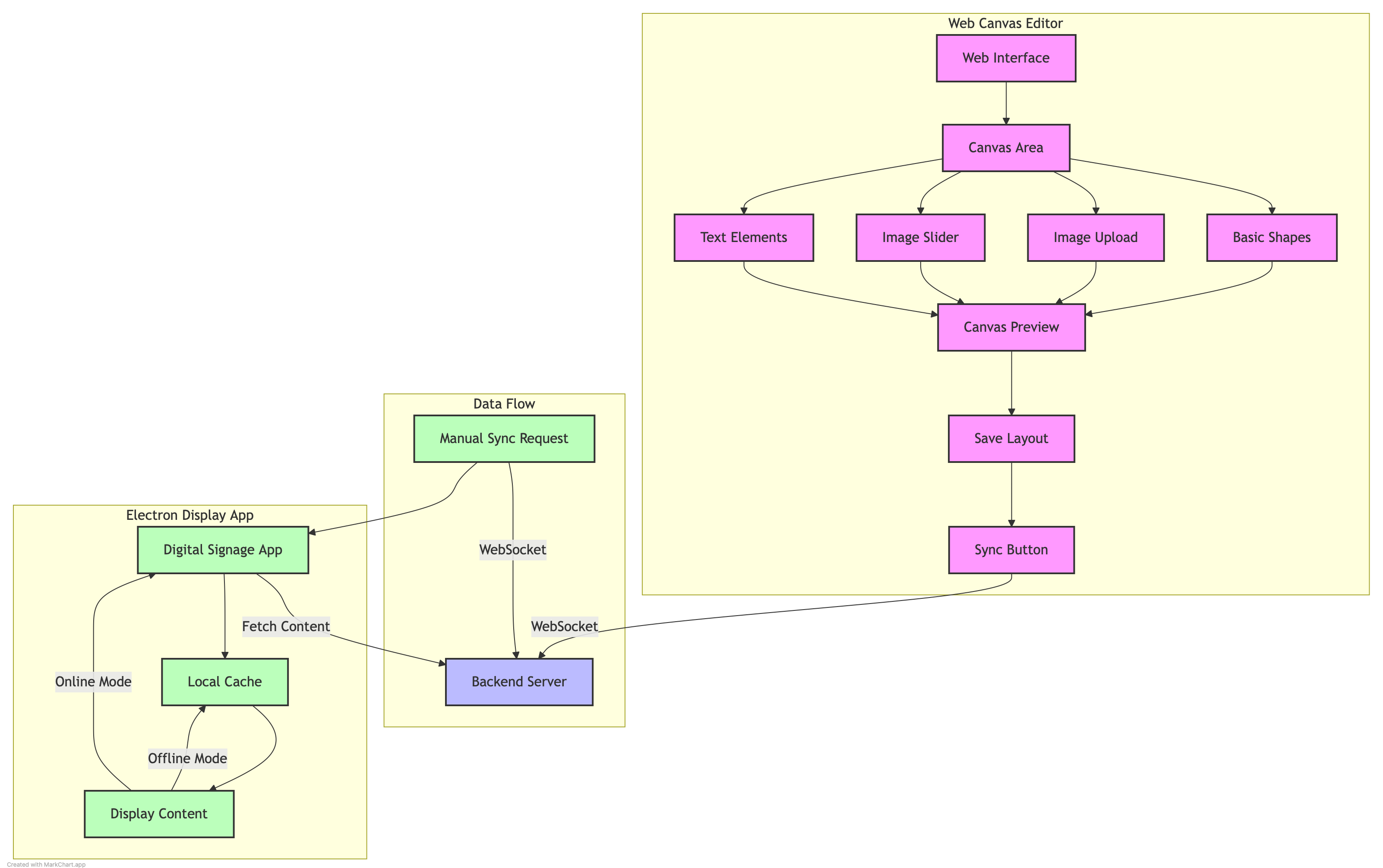
Content is synced to the Electron app (which acts as a digital signage display) via a sync button using WebSockets
The Electron app caches content locally to maintain functionality even without internet connection
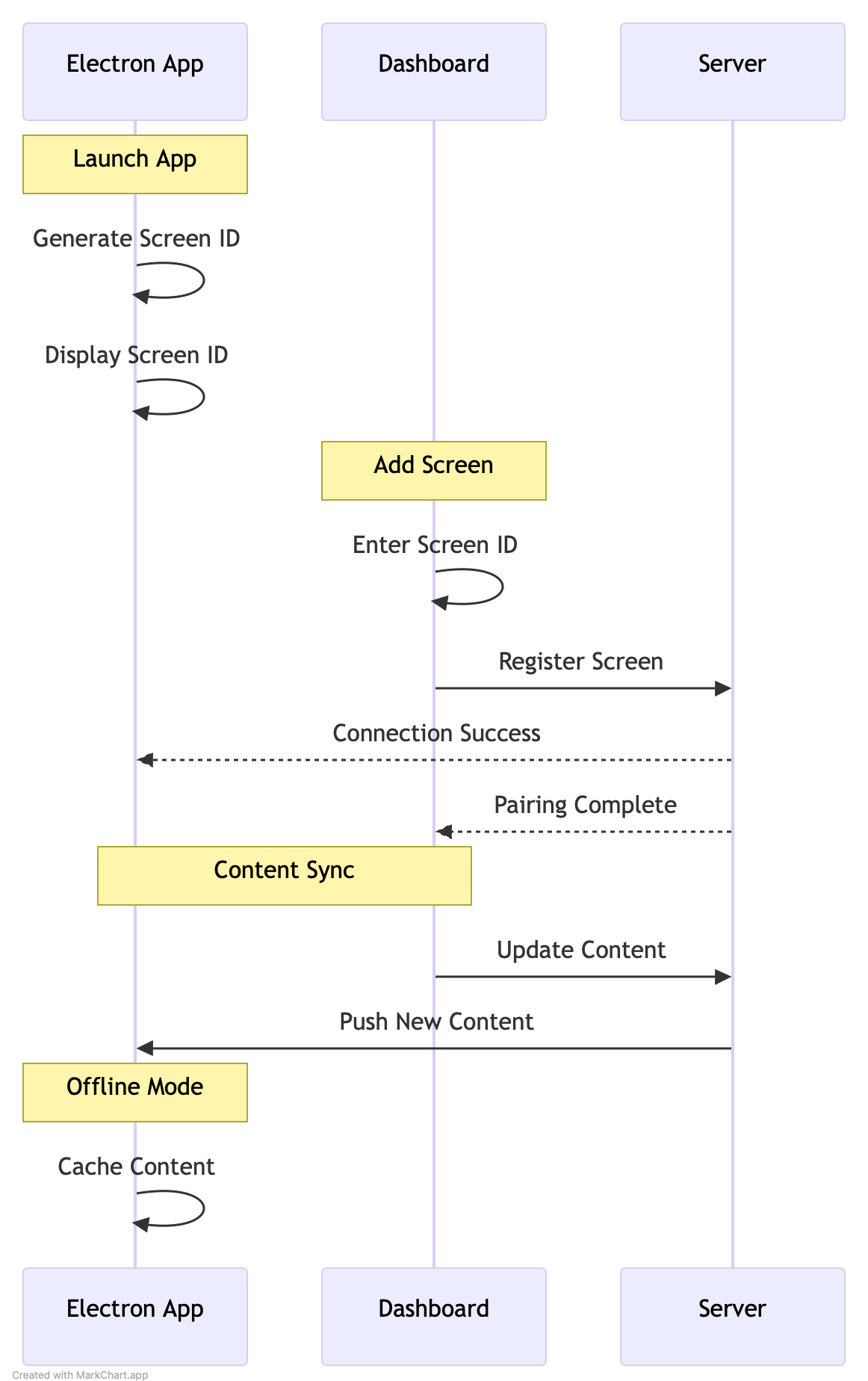
For the pairing system, it’s a simple code generation system where one side generates a code that’s entered on the other side to establish the connection. I’ve attached diagrams showing both this process and the overall system flow.
Regarding the backend, while we use MongoDB in production, for this demonstration you can use a simple JSON file or SQLite to save time (flow diagram attached).
In Summary:
- Web Dashboard Features
- Simple content creation interface (text, images, and basic layouts using fabric.j)
- Content preview functionality
- Content scheduling options (optional)
- Content list with status indicators
- Basic content organization (folders/categories)
- Display device status monitoring
- Electron Display Application
- Full-screen content display
- Support for text and image content
- Manual sync button with status indicator
- Auto-sync toggle option
- Offline content playback
- System tray controls
- Connection status indicator
- Basic error notifications
- Offline Capabilities
- Local content storage for offline playback
- Content caching mechanism
- Automatic content sync when connection restored
- Local content backup
- Offline status indication
- Technical Requirements
- WebSocket implementation for real-time updates
- Local storage implementation
- Clean, responsive user interface
- Basic security implementation
- Error logging and handling
- Documentation
Project Deliverables:
- Source code in a private GitHub repository
- Dashboard must be accessible live via Vercel
- Electron app must be paired through code pairing system or QR code
- Demonstration of offline capabilities
- README with:
- Setup instructions for both dashboard and display app
- Architecture overview
- WebSocket implementation details
- Offline functionality explanation
- Known limitations
- Future improvements
For the detailed explanation and the user flow review the following documents:
Notes:
- Feel free to ask questions if anything is unclear
- You are free to use this repo in order to grasp the idea and build upon it (GitHub Repo)
- The project must be presented on Github and well documented projects will be reviewed first
- The project you submit must be live and functional for our team in order to be reviewed
- Focus on functionality first, then enhance the visual design
- Test your work thoroughly